> ## Documentation Index
> Fetch the complete documentation index at: https://docs.halliday.xyz/llms.txt
> Use this file to discover all available pages before exploring further.

# Halliday JS SDK Widget Documentation

export const OpenHallidayDemoPage = () => {
  return <div>
            <style>{`
                .demoButtonContainer {
                    display: block;
                    margin: auto;
                    width: max-content;
                }
                .demoButton {
                    border: none;
                    opacity: 1;
                    background-color: rgb(var(--primary));
                    color: white;
                    font-weight: 500;
                    width: auto;
                    height: 50px;
                    border-radius: 8px;
                    display: inline-flex;
                    align-items: center;
                    padding: 10px 18px;
                    transition: all 0.2s ease;
                }
                .demoButton::before {
                    content: '';
                    width: 20px;
                    height: 20px;
                    margin-right: 10px;
                    background-color: currentColor;
                    mask: url('data:image/svg+xml;base64,PHN2ZyB4bWxucz0iaHR0cDovL3d3dy53My5vcmcvMjAwMC9zdmciIHZpZXdCb3g9IjAgMCAyOS4wNjggMjIuNDA4IiBvdmVyZmxvdz0idmlzaWJsZSIgc3R5bGU9ImJhY2tncm91bmQ6IHRyYW5zcGFyZW50OyI+PGcgdHJhbnNmb3JtPSJ0cmFuc2xhdGUoMCwgLTYuNTc1KSI+PHBhdGggZD0iTSA2LjY4NiA2LjU3NSBDIDcuMjEgNi41NzUgNy42OTYgNi44NTUgNy45NiA3LjMxMyBMIDkuNjUyIDEwLjIzOCBMIDQuNTEyIDEwLjIzOCBDIDQuMDk4IDEwLjI0MiAzLjc2NSAxMC41OCAzLjc2NyAxMC45OTQgTCAzLjc2NyAyNC41NjUgQyAzLjc2NyAyNC45ODIgNC4xMDEgMjUuMzIxIDQuNTEzIDI1LjMyMSBMIDkuNjUzIDI1LjMyMSBMIDExLjQzOCAyMi4yMzcgQyAxMS42NDQgMjEuODgzIDEyLjAyIDIxLjY2MyAxMi40MjggMjEuNjYzIEwgMTYuNjM4IDIxLjY2MyBDIDE3LjA0NyAyMS42NjMgMTcuNDIxIDIxLjg4MiAxNy42MjggMjIuMjM3IEwgMTkuNDEyIDI1LjMxOSBMIDkuNjU3IDI1LjMxOSBMIDcuOTYzIDI4LjI0NSBDIDcuNjk3IDI4LjcwMyA3LjIxMyAyOC45ODMgNi42ODkgMjguOTgzIEwgMy41NzQgMjguOTgzIEMgMS42IDI4Ljk4MyAwIDI3LjM2MyAwIDI1LjM2NiBMIDAgMTAuMTkgQyAwIDguMTk0IDEuNiA2LjU3NSAzLjU3MSA2LjU3NSBaIiBmaWxsPSJyZ2IoMCwwLDApIi8+PHBhdGggZD0iTSAyNS40OTQgNi41NzUgQyAyNy40NjkgNi41NzUgMjkuMDY4IDguMTk0IDI5LjA2OCAxMC4xOTEgTCAyOS4wNjggMjUuMzcgQyAyOS4wNjggMjcuMzY3IDI3LjQ2OCAyOC45ODYgMjUuNDk0IDI4Ljk4NiBMIDIyLjM4IDI4Ljk4NiBDIDIxLjg1NCAyOC45ODYgMjEuMzY4IDI4LjcwNCAyMS4xMDYgMjguMjQ4IEwgMTkuNDEzIDI1LjMyMyBMIDI0LjU1NiAyNS4zMjMgQyAyNC45NjcgMjUuMzIzIDI1LjMwMiAyNC45ODMgMjUuMzAyIDI0LjU2NyBMIDI1LjMwMiAxMC45OTUgQyAyNS4zMDMgMTAuNzk2IDI1LjIyNSAxMC42MDQgMjUuMDg2IDEwLjQ2MyBDIDI0Ljk0NiAxMC4zMjEgMjQuNzU1IDEwLjI0MSAyNC41NTYgMTAuMjQgTCAxOS40MTYgMTAuMjQgTCAyMS4xMDcgNy4zMTMgQyAyMS4zNzEgNi44NTggMjEuODU2IDYuNTc3IDIyLjM4MiA2LjU3NSBMIDI1LjQ5NSA2LjU3NSBaIiBmaWxsPSJyZ2IoMCwwLDApIi8+PHBhdGggZD0iTSAxOS40MTMgMjUuMzIxIEwgMTkuNDEzIDI1LjMxOSBMIDE5LjQxNCAyNS4zMTkgTCAxOS40MTQgMjUuMzIxIFoiIGZpbGw9InJnYigwLDAsMCkiLz48cGF0aCBkPSJNIDE3LjYzMiAxMy4zMjQgTCAxNy42MyAxMy4zMjQgQyAxNy40MjYgMTMuNjc4IDE3LjA0OCAxMy44OTYgMTYuNjQgMTMuODk3IEwgMTIuNDIzIDEzLjg5NyBDIDEyLjAxNiAxMy44OTcgMTEuNjM5IDEzLjY4IDExLjQzMyAxMy4zMjQgTCA5LjY1MiAxMC4yNCBMIDE5LjQxNCAxMC4yNCBMIDE3LjYzMyAxMy4zMjMgWiIgZmlsbD0icmdiKDAsMCwwKSIvPjwvZz48L3N2Zz4=') no-repeat center;
                    mask-size: contain;
                    flex-shrink: 0;
                }
            `}</style>
            <div className="demoButtonContainer">
                <button className="demoButton" onClick={() => window.open('https://demo.halliday.xyz', '_blank', 'noopener,noreferrer')}>Try Halliday
                </button>
            </div>
        </div>;
};

The Halliday JS SDK widget allows users to perform onramps, swaps, and exchange withdrawals to or from any chain or token with minimal integration effort.

It provides the most rapid integration of Halliday with a feature-rich configuration.

To have more fine-grained control over the user interface, review the [Halliday API](/pages/halliday-api-docs) documentation.

To use the Halliday JS SDK, first get a free API key at [dashboard.halliday.xyz](https://dashboard.halliday.xyz/).

***

## Try the Halliday JS SDK Widget

Following this guide, or the [Payments Hello World](/pages/payments-hello-world) guide will result in an experience like the following demo.

<OpenHallidayDemoPage />

## Installation

Install the Payments SDK, which is available on NPM.

<Tabs>
  <Tab title="npm">
    ```shell theme={null}
    npm install @halliday-sdk/payments
    ```
  </Tab>

  <Tab title="yarn">
    ```shell theme={null}
    yarn add @halliday-sdk/payments
    ```
  </Tab>
</Tabs>

Next the SDK can be imported into a front-end TypeScript or JavaScript project.

```typescript copy theme={null}
import {
  initializeClient,
  openHallidayPayments,
} from '@halliday-sdk/payments'
```

## Initialization Options

The `initializeClient` function initializes the Halliday JS SDK instance and prepares the widget interface to subsequently be opened and displayed to the user.

To open the SDK widget interface, like in a deposit button click event handler, use the `openHallidayPayments` function. More on the deposit button pattern in the [SDK Deposits](/pages/sdk-deposits) section.

Both `initializeClient` and `openHallidayPayments` accept the following configuration options.

| Name                             | Type                                                               | Description                                                                                                                                                                                         |
| :------------------------------- | :----------------------------------------------------------------- | :-------------------------------------------------------------------------------------------------------------------------------------------------------------------------------------------------- |
| `apiKey`                         | string                                                             | Your API key for authorization.                                                                                                                                                                     |
| `destinationAddress`             | string                                                             | The address of the destination wallet for onramps and swaps.                                                                                                                                        |
| `inputs` (optional)              | Asset\[]                                                           | The input assets for the widget.                                                                                                                                                                    |
| `outputs`                        | Asset\[]                                                           | The output assets for the widget.                                                                                                                                                                   |
| `customStyles` (optional)        | object ([CustomStyles](/pages/payments-sdk-docs#type-definitions)) | A list of custom styles to show in the widget. See [customizing styles](#customizing-styles).                                                                                                       |
| `targetElementId` (optional)     | string                                                             | The ID of the DOM element where the widget should be embedded if modal mode is not desired.                                                                                                         |
| `onStatus` (optional)            | OnStatus                                                           | Callback to receive status events.                                                                                                                                                                  |
| `onConnectUserWallet` (optional) | () => void                                                         | Callback invoked when the user requests to connect their wallet.                                                                                                                                    |
| `onReady` (optional)             | () => void                                                         | Callback invoked when the widget is fully preloaded and ready.                                                                                                                                      |
| `onError` (optional)             | OnError                                                            | Callback invoked when the widget fails to load or another error occurs.                                                                                                                             |
| `userWallet` (optional)          | UserWallet                                                         | User wallet configuration with signing functions. This wallet address is the sole controller of the payment. If this is not provided, the user will be prompted to sign-in with an embedded wallet. |
| `funder` (optional)              | FunderRole                                                         | Funder wallet configuration with signing functions. If funder is not provided, the "pay with wallet" option will not be available to the user.                                                      |
| `funders` (optional)             | FunderRole\[]                                                      | Additional funding sources available to the user at the time of a payment. See the Multiple Funders section below.                                                                                  |
| `fontName` (optional)            | FontName                                                           | Font for the widget. Default is 'haffer'. 'wudoo-mono' or 'inter' available.                                                                                                                        |
| `headerTitle` (optional)         | string                                                             | Custom title for the widget header.                                                                                                                                                                 |

### Type Definitions

```ts theme={null}
type Address = string;

type TypedData = string;

interface TransactionRequest {
  to: string;
  from?: string;
  nonce?: number;
  gasLimit?: bigint;
  gasPrice?: bigint;
  maxPriorityFeePerGas?: bigint;
  maxFeePerGas?: bigint;
  data?: string;
  value?: bigint;
  chainId: number;
}

interface TransactionReceipt {
  transactionHash?: string;
  blockHash?: string;
  blockNumber?: number;
  from?: string;
  to?: string;
  // Preserves the original receipt from ethers or viem
  rawReceipt: any;
}

interface CustomStyles {
  primaryColor?: string;
  backgroundColor?: string;
  borderColor?: string;
  textColor?: string;
  textSecondaryColor?: string;
  accentColor?: string;
  componentShadow?: string;
  borderStyle?: "SQUARE" | "DEFAULT";
  backgroundStyle?: "OFF" | "BLUR";
  successColor?: string;
  alertColor?: string;
}

type FontName = "haffer" | "wudoo-mono"| "inter";

type HeaderTitle = string;

type Asset = string; // Format: "chainId:tokenAddress" or native token identifier or fiat symbol

// i.e. 'stripe'
type RampName = string; // Onramp/offramp provider names

type OnStatus = (input: { type: string; payload: any }) => void;
type OnConnectUserWallet = () => void;
type OnReady = () => void;
type OnError = (error: Error) => void;

type SignMessage = (input: { message: string; ownerAddress?: Address }) => Promise<string>;
type SignTypedData = (input: { typedData: string; ownerAddress?: Address }) => Promise<string>;
type SendTransaction = (
    transaction: TransactionRequest,
    chainConfig: EVMChainConfig,
) => Promise<TransactionReceipt>;

interface FunderRole {
  getAddress: () => Promise<Address>;
  sendTransaction: SendTransaction;
  walletName?: string;
}

interface UserWallet {
  getAddress: () => Promise<Address>;
  signMessage: SignMessage;
  signTypedData: SignTypedData;
  sendTransaction?: SendTransaction;
  walletName?: string;
}

interface PaymentsWidgetSDKParams {
  apiKey: string;
  outputs: Asset[];
  sandbox?: boolean;
  destinationAddress?: Address;
  customStyles?: CustomStyles;
  targetElementId?: string;
  fontName?: FontName;
  headerTitle?: HeaderTitle;
  userWallet?: UserWallet;
  funder?: FunderRole;

  onStatus?: OnStatus;
  onConnectUserWallet?: () => void;
  onReady?: () => void;
  onError?: (error: Error) => void;
}

interface WithdrawParams {
  withdrawInputs?: Asset[];
  withdrawFunder: FunderRole;
  withdrawDestinationAddress?: Address;
}
```

## Usage Patterns

### Using the wallet connector

Halliday can prompt users to choose a wallet to connect to the app. The wallet connector provides many options including MetaMask, Coinbase Wallet, Rainbow, or Wallet Connect.

Clicking the button will trigger the connect-wallet prompt. If the application already prompts the user to connect a wallet, see [using a connected wallet](#using-a-connected-wallet).

```tsx copy theme={null}
import { openHallidayPayments } from "@halliday-sdk/payments";

openHallidayPayments({
    apiKey: HALLIDAY_PUBLIC_API_KEY,
    // USDC on Base
    outputs: ["base:0x833589fcd6edb6e08f4c7c32d4f71b54bda02913"],
});
```

***

### Using a connected wallet

The Halliday JS SDK can accept an existing wallet connection object that an app has already established.

With this flow, users do not need to reconnect their wallet using the Halliday external wallet modal, creating an optimal user experience for Web3 applications.

If the application does not already have a connected wallet, see [using the wallet connector](#using-the-wallet-connector).

Support for existing Viem, Wagmi, and Ethers.js wallet connections are available to Halliday JS SDK developers. These functions also allow the widget to utilize the proper account if the user switches the address or network in their wallet extension.

```ts copy theme={null}
// For Viem or Wagmi
import { connectWalletClient } from "@halliday-sdk/payments/viem";

// For Ethers.js
import { connectSigner } from "@halliday-sdk/payments/ethers";
```

```js theme={null}
openHallidayPayments({
    // ...
    userWallet: {
        getAddress: async () => "0x...",                // required, async
        signMessage: async ({ message }) => "...",      // required
        signTypedData: async ({ typedData }) => "...",  // required
        sendTransaction: async (tx, chain) => TransactionReceipt, // Optional
        walletName: "Bob's Account", // Optional, shown in the wallet selector
    },
    onConnectUserWallet: () => { /* trigger wallet connect */ },
    // ...
});
```

#### Viem

```typescript copy theme={null}
import { openHallidayPayments } from "@halliday-sdk/payments";
import { connectWalletClient } from "@halliday-sdk/payments/viem";
import { createWalletClient, custom } from "viem";
import { base } from "viem/chains";

const connect = async () => {
  const accounts = await window.ethereum.request({ method: "eth_requestAccounts" });
  const destinationAddress = accounts[0];

  const userWallet = connectWalletClient(() =>
    createWalletClient({
      chain: base,
      transport: custom(window.ethereum),
    }),
  );

  openHallidayPayments({
    apiKey: HALLIDAY_PUBLIC_API_KEY,
    outputs: ["base:0x833589fcd6edb6e08f4c7c32d4f71b54bda02913"],
    userWallet,
    destinationAddress,
  });
};
```

#### Wagmi

```jsx copy theme={null}
import { useEffect } from "react";
import { openHallidayPayments } from "@halliday-sdk/payments";
import { connectWalletClient } from "@halliday-sdk/payments/viem";
import { useAccount, useWalletClient } from "wagmi";

export default function App() {
  const { address, isConnected } = useAccount();
  const { data: walletClient, isSuccess } = useWalletClient();

  useEffect(() => {
    if (!isConnected || !isSuccess || !walletClient || !address) return;

    const userWallet = connectWalletClient(() => walletClient);

    openHallidayPayments({
      apiKey: HALLIDAY_API_KEY,
      outputs: ["base:0x833589fcd6edb6e08f4c7c32d4f71b54bda02913"],
      targetElementId: "halliday",
      destinationAddress: address,
      userWallet,
    });
  }, [isConnected, isSuccess, walletClient, address]);

  return <div id="halliday" />;
}
```

#### Ethers.js

```typescript copy theme={null}
import { openHallidayPayments } from "@halliday-sdk/payments";
import { connectSigner } from "@halliday-sdk/payments/ethers";
import { BrowserProvider } from "ethers";

const connect = async () => {
  const [address] = await window.ethereum.request({ method: "eth_requestAccounts" });

  const userWallet = connectSigner(() =>
    new BrowserProvider(window.ethereum).getSigner(),
  );

  openHallidayPayments({
    apiKey: HALLIDAY_PUBLIC_API_KEY,
    outputs: ["base:0x833589fcd6edb6e08f4c7c32d4f71b54bda02913"],
    destinationAddress: address,
    userWallet,
  });
};
```

#### Dynamic

The following code example is a demonstration of passing a Dynamic embedded wallet provider to the Halliday JS SDK in a full React app which is available in the [SDK example apps section](/pages/payments-sdk-example-apps).

```jsx theme={null}
import { useDynamicContext, useIsLoggedIn } from '@dynamic-labs/sdk-react-core'
import { useAccount, useWalletClient } from 'wagmi'
import { openHallidayPayments } from '@halliday-sdk/payments'
import { connectWalletClient } from '@halliday-sdk/payments/viem'

const HALLIDAY_PUBLIC_API_KEY = import.meta.env.VITE_HALLIDAY_API_KEY

function App() {
  const { sdkHasLoaded, setShowAuthFlow, handleLogOut } = useDynamicContext();
  const isLoggedIn = useIsLoggedIn();
  const { address, isConnected } = useAccount();
  const { data: walletClient, isSuccess } = useWalletClient();

  const launchHalliday = async () => {
    if (!isConnected || !address || !isSuccess || !walletClient) return;

    // Remember to add Base in the Dynamic dashboard beforehand
    const userWallet = connectWalletClient(() => walletClient);

    openHallidayPayments({
      apiKey: HALLIDAY_PUBLIC_API_KEY,
      outputs: ['base:0x833589fcd6edb6e08f4c7c32d4f71b54bda02913'],
      destinationAddress: address,
      userWallet,
    });
  };

  if (!sdkHasLoaded) return <p>Loading...</p>;

  if (!isLoggedIn) {
    return <button onClick={() => setShowAuthFlow(true)}>Sign in</button>;
  }

  return (
    <div>
      <button onClick={handleLogOut}>Log out</button>
      <p>Wallet: {address}</p>
      <button onClick={launchHalliday}>Open Halliday</button>
    </div>
  );
}

export default App
```

#### Privy

In addition to the following code example, a demonstration of passing a connected Privy wallet to the Halliday JS SDK in a full React app is available in the [SDK example apps section](/pages/payments-sdk-example-apps).

```jsx theme={null}
import { openHallidayPayments } from '@halliday-sdk/payments'
import { usePrivy, useWallets } from '@privy-io/react-auth'
import { connectSigner } from '@halliday-sdk/payments/ethers'
import { BrowserProvider } from 'ethers'

function Component() {
  const { ready, authenticated, login, logout } = usePrivy()
  const { wallets } = useWallets()

  const connect = async () => {
    // Get the embedded wallet (or find the one you want)
    // const wallet = wallets.find(w => w.walletClientType === 'privy');
    const wallet = wallets[0];
    if (!wallet) return;

    const provider = await wallet.getEthereumProvider();

    const userWallet = connectSigner(() =>
      new BrowserProvider(provider).getSigner(),
    );

    openHallidayPayments({
      apiKey: HALLIDAY_PUBLIC_API_KEY,
      outputs: ["base:0x833589fcd6edb6e08f4c7c32d4f71b54bda02913"],
      destinationAddress: wallet.address,
      userWallet,
    });
  };

  return (<div>...</div>);
}

export default Component
```

#### Turnkey

Turnkey embedded wallet signatures can be integrated with the Halliday JS SDK using the
`@turnkey/react-wallet-kit` and `@turnkey/viem` SDKs with `viem` and `@halliday-sdk/payments`. The developer is required to create an interface for the Turnkey SDK. A full React.js code example is available here: [Halliday JS SDK Turnkey React.js Example](https://github.com/HallidayInc/HallidaySdkTurnkeyReactExample).

### Initializing the widget before showing

For the best user experience, the widget can be preloaded so it appears instantly when it is ready to be shown.

The `initializeClient` call should be done in the initial loading phase of the app.

Later, the `openHallidayPayments` call can be executed once the widget user interface is ready to be shown to the user, like when a deposit button is clicked or tapped.

Both the `initializeClient` and `openHallidayPayments` functions can have the same configuration parameters passed to them.

If an `initializeClient` call is made with all of the necessary parameters passed to it, the subsequent call to `openHallidayPayments` can be done without including any parameters.

```typescript copy theme={null}
import { initializeClient } from "@halliday-sdk/payments";

// Call early in your app (e.g., on mount)
initializeClient({
  apiKey: HALLIDAY_PUBLIC_API_KEY, // required
  outputs: ["base:0x833589fcd6edb6e08f4c7c32d4f71b54bda02913"], // required
  onReady: () => { console.log('Preloaded and ready') }, // optional
  onError: (error) => { console.error(error) }, // optional
  userWallet, // optional
});

// Next, call openHallidayPayments
```

### Withdraw Widget

For apps that define an account for the user, like an embedded wallet or smart contract wallet, the withdraw widget allows the user to move assets out of their account.

The destination of a withdrawal can be any valid address like the user's EOA or a centralized exchange account deposit address.

The destination also can be a different asset on a different chain from the origin. E.g. withdraw pUSD from a user's prediction market account on Polygon to an EOA on MegaETH as USDC, executed in one user interaction.

In practice, the withdraw widget (`openWithdraw`) is opened by a different button in the app user interface than the standard deposit widget defined earlier (`openHallidayPayments`).

It is **required** that the `initializeClient` method is called before `openWithdraw`.

| Name                                    | Type       | Description                                                                                                                                                                                          |
| :-------------------------------------- | :--------- | :--------------------------------------------------------------------------------------------------------------------------------------------------------------------------------------------------- |
| `withdrawInputs` (optional)             | Asset\[]   | Assets that are able to be withdrawn from the account. If `initializeClient` or `openHallidayPayments` was called prior, and `withdrawInputs` is not passed, the prior `outputs` value will be used. |
| `withdrawFunder` (required)             | FunderRole | Funder wallet configuration with signing functions.                                                                                                                                                  |
| `withdrawDestinationAddress` (optional) | string     | Target address for the withdraw. If not defined, the `withdrawFunder` address is used as the destination of the withdrawal.                                                                          |

```typescript copy theme={null}
import { openWithdraw } from "@halliday-sdk/payments";

openWithdraw({
  withdrawInputs: ["base:0x833589fcd6edb6e08f4c7c32d4f71b54bda02913"], // (optional)
  withdrawFunder: {
    getAddress: async () => "0x...",
    sendTransaction: async (tx, chain) => TransactionReceipt,
  }, // (required)
  withdrawDestinationAddress: '0x...',  // (optional) 
});
```

### Show Account History

To show the past Halliday payment activity of the account in the widget, the user can click or tap the icon at the top right of the widget. This opens the **Transactions & activity** page of the widget.

To directly open this screen in the widget, use the `openActivity` method. In order to open this, a `userWallet` must be connected beforehand.

This example connects a wallet beforehand with the `initializeClient` method.

```typescript copy theme={null}
import { initializeClient, openActivity } from "@halliday-sdk/payments";

/*
 * Call `openHallidayPayments` or `initializeClient` with a `userWallet` 
 *     parameter before calling `openActivity`.
 */

initializeClient({
  apiKey: HALLIDAY_PUBLIC_API_KEY, // required
  outputs: ["base:0x833589fcd6edb6e08f4c7c32d4f71b54bda02913"], // required
  userWallet, // required for `openActivity` to work properly
});

// For example, show the user an "Account Activity" button within the app UI.
// This would be the button's click event handler
function showAccountActivity() {
  openActivity();
}
```

This example connects a wallet beforehand with the `openHallidayPayments` method.

```typescript copy theme={null}
import { openHallidayPayments, openActivity } from "@halliday-sdk/payments";

// Call prior to calling `openActivity`
openHallidayPayments({
  apiKey: HALLIDAY_PUBLIC_API_KEY, // required
  outputs: ["base:0x833589fcd6edb6e08f4c7c32d4f71b54bda02913"], // required
  userWallet, // required
});

function showAccountActivity() {
  openActivity();
}
```

### Multiple Funders

In the scenario that a developer chooses to show multiple possible funding sources for the user, an array of funder objects can be passed to `initializeClient` or `openHallidayPayments`.

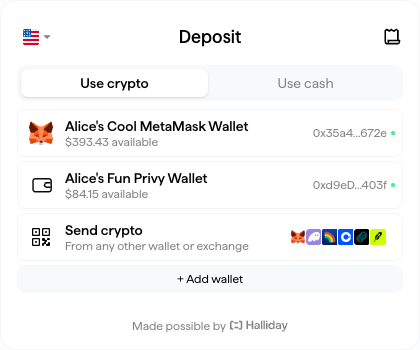
Funders can be any address that is expected to fund a payment. The SDK widget will take account of token balances at the time of a payment so the user can select a possible input token and amount.

**Naming Each Funder**

To differentiate funders in the UI, a name string can be supplied that will be shown to the user. Pass `walletName` as a member of each funder object.

```typescript copy theme={null}
import { initializeClient, openHallidayPayments } from "@halliday-sdk/payments";

// First run initialization of the widget
// Create connections to multiple funding source wallets, like shown earlier

userWallet.walletName = "Alice's Cool MetaMask Wallet";
privyWallet.walletName = "Alice's Fun Privy Wallet";

openHallidayPayments({
  userWallet,
  funders: [
    userWallet,  // User's MetaMask or the like
    privyWallet, // Embedded wallet that the user is signed into with a balance
    // More funders can go here
  ]
});
```
<br />

<div style={{width: "100%", display: "flex", justifyContent: "center" }}>
  <img src="https://mintcdn.com/halliday/8eR-179Av4zxcgBm/public/img/multiple-funder-wallets-halliday.png?fit=max&auto=format&n=8eR-179Av4zxcgBm&q=85&s=3fa7c1061e058497366ebe78eebddaa0" width="420" height="350" data-path="public/img/multiple-funder-wallets-halliday.png" />
</div>

### Embedding the SDK Widget

By default, the Payments Widget opens as a modal overlaying the web page.

Another option is to embed it within a page. This can be done by providing one option: `targetElementId`.

```typescript copy theme={null}
import { openHallidayPayments } from "@halliday-sdk/payments";

openHallidayPayments({
    apiKey: HALLIDAY_PUBLIC_API_KEY,
    outputs: ["base:0x833589fcd6edb6e08f4c7c32d4f71b54bda02913"],
    targetElementId: "element-id", // Embed the widget inside an HTML element by id
});
```

***

### Customizing styles

Halliday supports setting custom styles on the Payments Widget in order to match an application's existing user interface.

```typescript copy theme={null}
import { openHallidayPayments } from "@halliday-sdk/payments";

openHallidayPayments({
    apiKey: HALLIDAY_PUBLIC_API_KEY,
    outputs: ["base:0x833589fcd6edb6e08f4c7c32d4f71b54bda02913"],
    customStyles: {
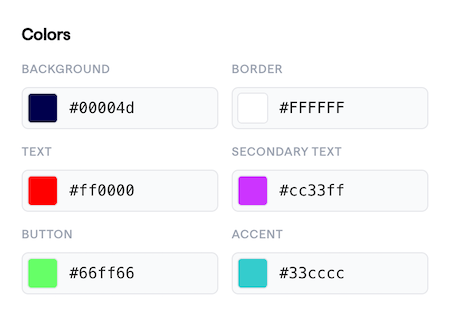
      primaryColor: '#66ff66', // Button (labeled in diagram below)
      backgroundColor: '#FFFFFF', // Background
      borderColor: 'rgba(255, 255, 255, 1)', // #FFFFFF Border
      textColor: '#ff0000', // Text
      textSecondaryColor: 'rgb(204, 51, 255)', // #CC33ff "Secondary text"
      accentColor: '#33cccc', // Accent
      componentShadow: '2px 5px #e6e6e6',
      borderStyle: 'SQUARE', // or undefined for default
      backgroundStyle: 'OFF', // or BLUR (uppercase only)
      zIndex: 1000, // number only
    },
    fontName: 'haffer', // also 'wudoo-mono' or 'inter'
    headerTitle: 'Checkout',
    // ...
});
```

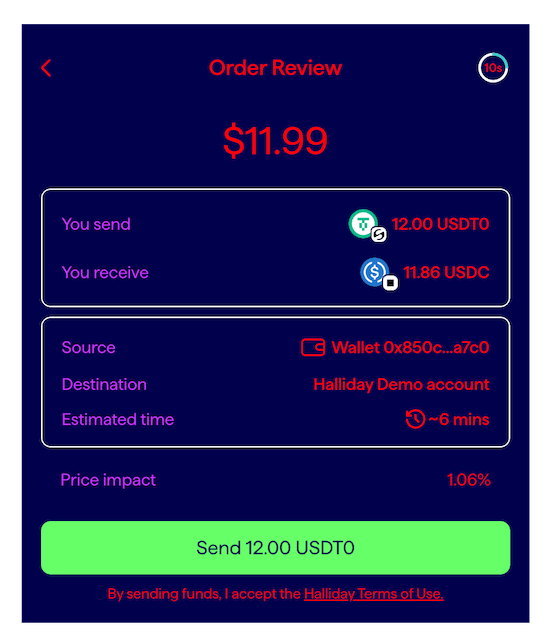
The following diagram shows how these values are used:

<br />

<div style={{width: "100%", display: "flex", justifyContent: "center" }}>
  <img src="https://mintcdn.com/halliday/8eR-179Av4zxcgBm/public/img/customize-ui.png?fit=max&auto=format&n=8eR-179Av4zxcgBm&q=85&s=7f6221480f2dca46ab37215891e00482" width="550" height="639" data-path="public/img/customize-ui.png" />
</div>

Colors in the above code and diagram:

<div style={{width: "100%", display: "flex", justifyContent: "center" }}>
  <img src="https://mintcdn.com/halliday/8eR-179Av4zxcgBm/public/img/sdk-widget-color-config.png?fit=max&auto=format&n=8eR-179Av4zxcgBm&q=85&s=8e0e057355fe9b1b7bcdd8d44f7d9722" width="450" height="316" data-path="public/img/sdk-widget-color-config.png" />
</div>

For further customization, please [contact the Halliday team](mailto:partnerships@halliday.xyz).

Building a completely custom user interface is possible by implementing the [Halliday API](/pages/halliday-api-docs), instead of the Halliday JS SDK.