> ## Documentation Index
> Fetch the complete documentation index at: https://docs.halliday.xyz/llms.txt
> Use this file to discover all available pages before exploring further.
# Fee Sponsorship
Each Halliday payment includes fees for expenses like blockchain network gas costs, onramp provider fees, and other necessary costs.
By default, end users cover these fees when their payment is funded.
Halliday provides the option for the app developer to enable a feature that sponsors fees on behalf of their end users - up to 100% of the cost.
## How fee sponsorship works
Whether it is an onramp or swap, each Halliday payment has an input currency amount and an output currency amount. Users fund their payment with the specified input amount and expect an approximate output amount based on conversion price, slippage, and fees.
Due to the fact that the input amount is fixed, payment fees are incurred on the output currency amount.
When fee sponsorship is enabled, a Halliday payment's output amount is topped up with an approximate amount of the output currency, in effect, covering the fees of a payment.
The app developer provides sponsorship for each payment from a single onchain balance of tokens.
### Sponsorship balance
When enabling this Halliday feature, app developers are assigned an address which holds a balance of the output token as well as the gas token of the output token's chain.
To enable this feature, app developers must toggle fee sponsorship on in the Configuration section of the [Halliday developer dashboard](https://dashboard.halliday.xyz/).
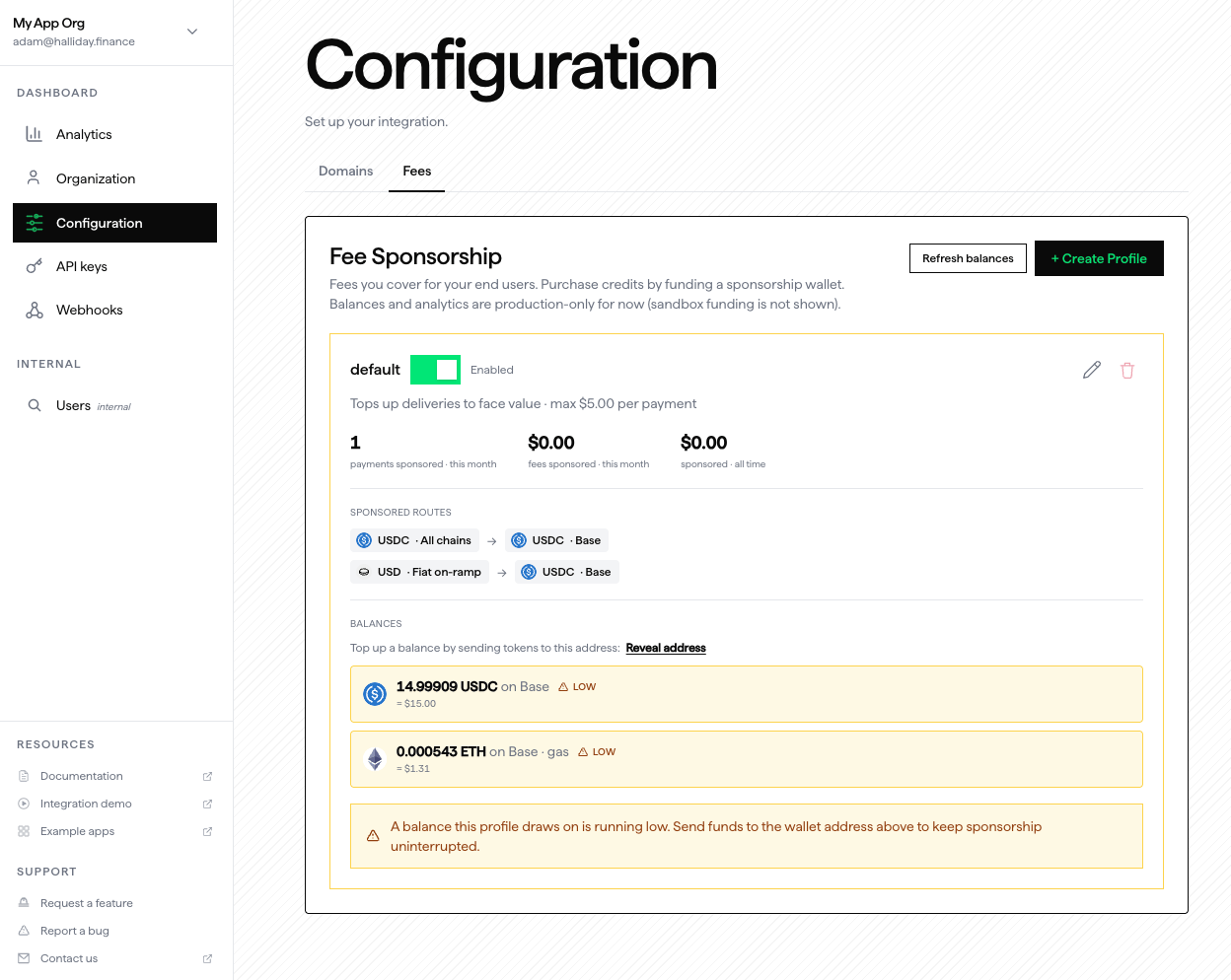
One balance address per organization is generated after a fee sponsorship profile is created. This address can hold many supported fee sponsorship tokens.
The developer must send output tokens and gas tokens on the proper chain to this address. EVM addresses are the only supported addresses at this time.
### Configuration and profile
The developer must set the maximum USD amount to cover in the dashboard. After this is configured, specific payments on the organization's API keys will include fee sponsorship.
Sponsorship profiles can be made in the dashboard. Each carries a `routes` array and can cover multiple output tokens.
The developer can make make multiple sponsorship profiles, each with its own ID. This profile ID is specified when individual payment quotes are signed and confirmed (see below).
Developers are responsible for maintaining the token balance that is used for fee sponsorship. If the fee sponsorship balance runs out, the end users will cover 100% of their payment fees while the balance is zero without the opportunity for reimbursement.
### Eligible Routes
The fee sponsorhip profile builder in the Halliday dashboard has a selector field that limits the input and output tokens shown to valid routes.
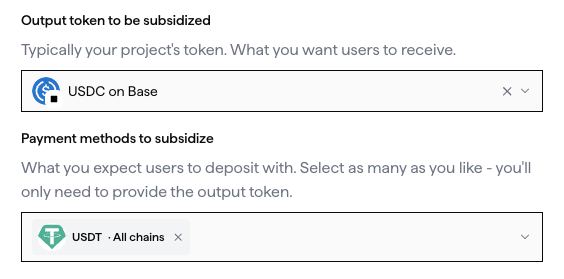
Not all token routes are eligible for fee sponsorhip. In order for a token route to be eligible for fee sponsorhip, the input and output currencies must be a roughly equal price in fiat during normal market conditions.
For example, an input of USD and output of USDC is valid because USDC is roughly equivalent to USD during normal market conditions. An input of USDC and an output of USDT is also valid.
An input of USDC and output of WETH is not valid because the WETH token price is not intentionally pegged to USDC.
A route of WETH -> WETH (on another chain) is valid because the fiat price of the input and output is roughly equal during normal market conditions.
## Fee sponsorship technical details
Fee sponsorship works for integrations that utilize the Halliday SDK or the Halliday API.
To avoid unauthorized use of fee sponsorship, **the app developer must cryptographically sign payment quotes** using their Halliday secret key.
After the quote is signed, it is then confirmed via the Halliday API before the user can fund the payment with the input currency. Quote requests will fail if a signature in the request body is invalid or has already been used.
App developers must host infrastructure to provide on-demand quote signatures. It is recommended that the developer host their own API endpoint in which sponsorships are validated and signed using the Halliday secret key.
The next section is a walkthrough of configuring the client-side code with the SDK. For apps that use the Halliday API directly instead of the SDK, the following section can be skipped.
## Client-side SDK configuration for fee sponsorship
Fee sponsorship settings in the SDK widget require an object with two parameters that is passed to the Halliday SDK configuration.
The `profileName` is a string that is the name of the sponsorship profile. This is initially created in the Halliday dashboard.
The `generateGrant` function is passed a quote payload. It must return the signature as a string wrapped in a JavaScript promise.
The payload passed to `generateGrant` has the following types.
```ts theme={null}
type Amount = string;
interface IFeeSponsorshipGrantPayload {
public_key: string;
fee_sponsorship_name: string;
max_fee_sponsorship_fiat?: Amount | null;
jti: string;
exp: number;
}
type ProfileName = string;
// The `payload` is a string of `IFeeSponsorshipGrantPayload`
type GenerateGrant = (payload: string) => Promise;
```
Here is an example of that payload. The Halliday SDK generates these payloads under the hood.
```js theme={null}
const payload = {
public_key: "pk_halliday_public_key",
fee_sponsorship_name: "my_profile_name",
jti: "3f2b8c1e-9d44-4a17-8e6b-0c5a7f1d2b93",
exp: 1787000000
}
```
The following is an SDK widget configuration example with fee sponsorship included.
```tsx copy theme={null}
const profileName = "__fee_sponsorship_profile_name_here__";
async function generateGrant(payload) {
const response = await fetch(__YOUR_API_ENDPOINT_URL_HERE__, {
method: 'POST',
headers: { 'Content-Type': 'application/json' },
body: JSON.stringify({ payload }),
});
if (!response.ok) {
throw new Error(`Halliday fee sponsorship error: ${response.status}`);
}
const { signature } = await response.json();
return signature;
}
createRoot(document.getElementById("root")).render(
);
```
```tsx copy theme={null}
async function generateGrant(payload) {
const response = await fetch(__YOUR_API_ENDPOINT_URL_HERE__, {
method: 'POST',
headers: { 'Content-Type': 'application/json' },
body: JSON.stringify({ payload }),
});
if (!response.ok) {
throw new Error(`Halliday fee sponsorship error: ${response.status}`);
}
const { signature } = await response.json();
return signature;
}
const halliday = new HallidayPayments({
apiKey: HALLIDAY_PUBLIC_API_KEY,
owner,
feeSponsorship: {
profileName: '__fee_sponsorship_profile_name_here__',
generateGrant,
},
deposit: {
outputs: ['base:0x833589fcd6edb6e08f4c7c32d4f71b54bda02913'],
destinationAddress: address,
}
});
```
## Client-side API configuration for fee sponsorship
For developers using the API directly from front-end applications instead of the Halliday SDK, the process requires one additional step.
Before [fetching a collection of quotes from the Halliday API](/pages/api-quickstart#get-a-collection-of-quotes-for-an-onramp), a signed sponsorship grant payload needs to be created and signed.
This `fee_sponsorship` object needs to be included in the `/payments/quotes` POST request body.
The following is an example for creating the `grant_payload` that needs to subsequently be signed using the Halliday secret key.
```js theme={null}
const grant_payload = JSON.stringify({
public_key: "pk_halliday_public_key",
fee_sponsorship_name: "my_profile_name", // set in dashboard
max_fee_sponsorship_fiat: "5.00", // for $5 USD
jti: crypto.randomUUID(), // e.g. "3f2b8c1e-9d44-4a17-8e6b-0c5a7f1d2b93",
exp: Math.floor(Date.now() / 1000) + ttl_seconds,
});
```
Once this payload string is securely signed in a developer's back-end server using the Halliday secret key, it is ready to be provided in a quote request from the client device.
```js theme={null}
const fee_sponsorship = {
grant_payload, // string
grant_signature // string
};
const quotes = await fetch("https://v2.prod.halliday.xyz/payments/quotes", {
method: "POST",
headers: {
"content-type": "application/json",
authorization: "Bearer pk_halliday_public_key",
},
body: JSON.stringify({
request: { kind: "FIXED_INPUT", /* more parameters here */ },
price_currency: "USD",
fee_sponsorship,
}),
});
```
The next section provides details on signing the `grant_payload` using the secret key.
## Server-side configuration for fee sponsorship
App developers must create and provide access to a service for cryptographic signing of payment quotes that utilize fee sponsorship. These signatures are created using the secret key.
### Getting the secret key
When an API key set is created in the [Halliday Dashboard](https://dashboard.halliday.xyz), the developer is provided two keys: the public key and the secret key. The public key begins with `pk_` and is to be included in client-side app code.
The secret key is provided once to the developer at the time of the key set creation. If this key is lost, the developer will need to create a new key set.
The secret key, which begins with `sk_`, has organization level admin permissions on the Halliday API. **Keep this key secured!**
### Creating a signature service
To create a valid signature, first create an HMAC key using the Halliday secret key. Remove the `sk_` prepend and create the HMAC key, which is a 64-character lowercase hex SHA-256 string.
Next, sign the JSON string of `IFeeSponsorshipGrantPayload` using the HMAC key.
The following is an example of the signature process in a back-end server API endpoint using Node.js with the Express.js framework.
```js theme={null}
import { createHmac } from 'node:crypto';
app.post('/halliday-signature', (req, res) => {
// Be sure to implement request validation!
// End user devices will make requests to this endpoint.
// The `payload` is a JSON object as a string.
const { payload } = req.body;
const hmacKey = createHash("sha256")
.update(HALLIDAY_SECRET_KEY.replace(/^sk_/, ""))
.digest("hex");
const signature = createHmac("sha256", hmacKey)
.update(payload)
.digest("hex");
res.json({ signature });
});
```